Schema Builder Plugin System
Schema Builder is designed as a platform-agnostic, open plugin system. Plugins are self-contained ES modules that can be loaded at runtime — no rebuild required. The architecture is intentionally decoupled: Schema Builder exposes a stable interface, and plugins talk to it through a declared contract.
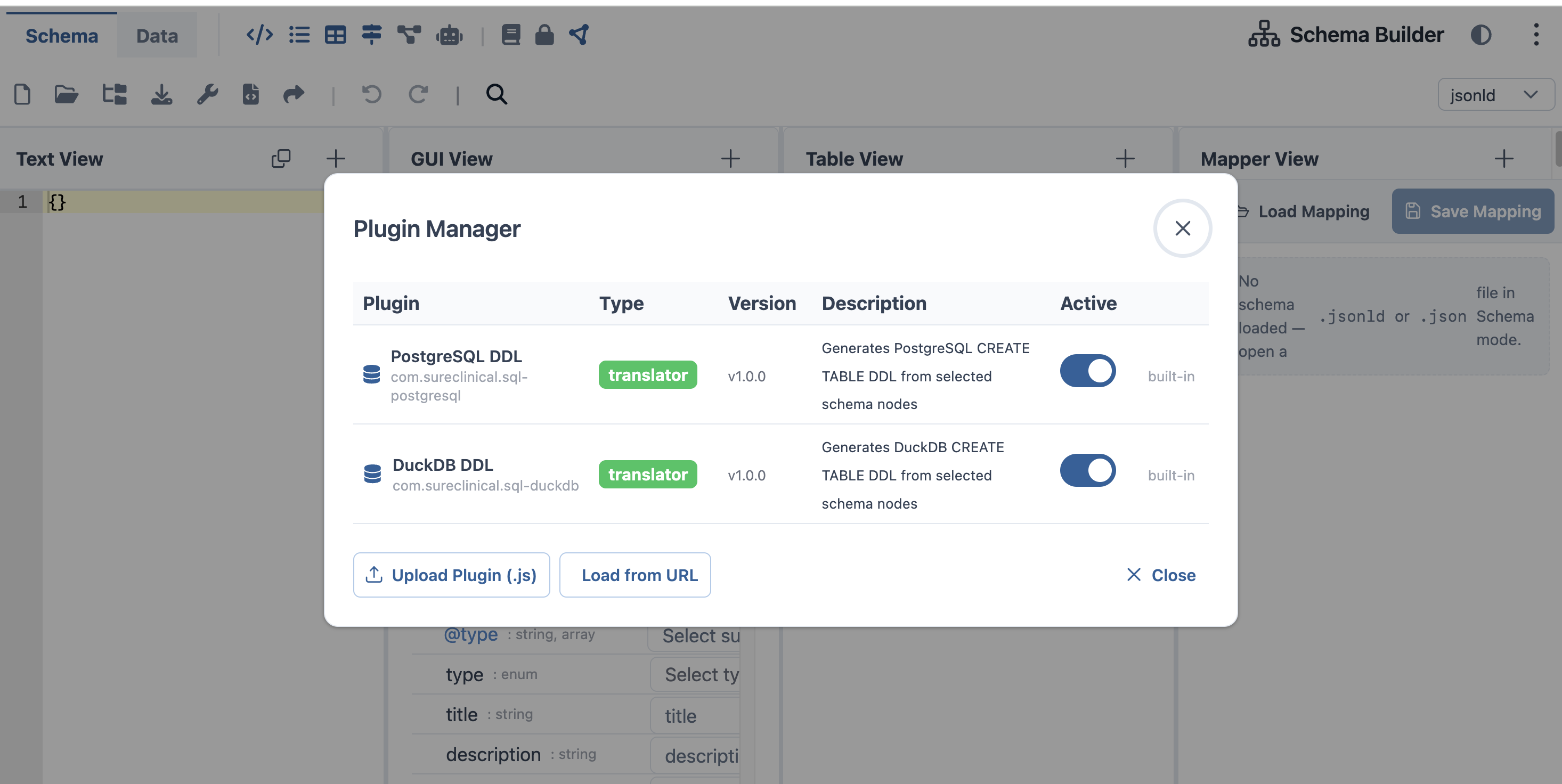 Schema Builder Plugin System User Interface
Design Philosophy
Schema Builder is not just a UI tool. It is a centralized, extensible schema services platform that can operate as:
- A standalone JSON-LD schema workbench
- An embedded service inside SureClinical's web client (iframe)
- A headless translation service invoked programmatically
- A plugin host for services written in Node.js, Python, Java Spring Boot, or any platform that produces an ES module
Plugins run either directly inside Schema Builder (in-browser ES module execution) or via a sandboxed runtime such as OpenSandbox for isolation, multi-tenancy, and cross-platform plugin hosting.
Plugin Types
| Type | Hook | Purpose |
|---|---|---|
translator | translate(rows, sourceUri) | Converts Mapper View rows into an output format: SQL DDL, OWL, CSV, etc. |
exporter | export() | Exports the entire active schema in a custom format |
panel | panelComponent (Vue) | Adds a new full panel to the Schema Builder UI |
importer | import() | Loads and merges an external schema source |
validator | validate(schema) | Runs custom validation rules, returns annotated issues |
Plugin Contract
Every plugin implements SchemaBuilderPlugin:
interface SchemaBuilderPlugin {
  // Required by all types
  id: string;           // Reverse-DNS: 'com.acme.my-plugin'
  name: string;
  description: string;
  pluginType: 'translator' | 'exporter' | 'panel' | 'importer' | 'validator';
  version: string;      // semver
  author: string;
  icon: string;         // FontAwesome class, e.g. 'fa-solid fa-database'

  // TRANSLATOR
  formatId?: string;    // key shown in Mapper View format dropdown
  translate?: (rows: MappingRow[], sourceUri: string) => string | Promise<string>;

  // PANEL
  panelComponent?: Component;         // Vue 3 component
  supportedModes?: SessionMode[];
  panelIcon?: string;
  panelLabel?: string;

  // IMPORTER
  import?: () => Promise<string | null>;  // returns JSON-LD string or null

  // VALIDATOR
  validate?: (schema: object) => Promise<ValidationIssue[]>;

  // Lifecycle (all types)
  onActivate?: () => void;
  onDeactivate?: () => void;
}

interface ValidationIssue {
  path: string;       // JSON Pointer path, e.g. '/entities/0/@id'
  severity: 'error' | 'warning' | 'info';
  message: string;
}
Plugin Loading
Plugins are loaded at runtime via dynamic ES import(). Two loading paths are supported:
From URL
await loadPluginFromUrl('https://cdn.example.com/my-plugin.js');
// or local dev server:
await loadPluginFromUrl('http://localhost:4000/dist/my-plugin.js');
The module must export a valid SchemaBuilderPlugin as its default export. Schema Builder validates the contract before registration — invalid plugins are rejected with a descriptive error.
From File
// User selects a .js file via the Plugin Manager dialog
await loadPluginFromFile(file); // File object from <input type="file">
The file is wrapped in a Blob URL, imported dynamically, then the URL is immediately revoked to prevent memory leaks.
Plugin Manager UI
The Plugin Manager is opened via the ⋮ overflow menu → View Plugins. It shows all registered plugins with type, version, description, and an active toggle. Built-in plugins cannot be removed. User-loaded plugins can be toggled or removed.
Plugin Registry
The registry is a reactive Vue 3 ref wrapping a Map<id, plugin>:
// Get all registered plugins (reactive — use in Vue templates)
const all = pluginRegistry.getAll; // computed<SchemaBuilderPlugin[]>

// Find a translator for a given format
const plugin = pluginRegistry.getTranslator('sql-duckdb');

// Check if a translator exists (used to enable/disable Export button)
const canExport = pluginRegistry.hasTranslator('sql-postgresql');

// Manual registration (for programmatic use)
pluginRegistry.register(myPlugin);
pluginRegistry.unregister('com.acme.my-plugin');
Panel auto-wiring: When a panel plugin is registered, it is automatically added to the Schema Builder toolbar — no manual wiring required. The plugin's panelComponent, panelLabel, and panelIcon are wired into the panel registry on register().
Built-in Plugins
Schema Builder ships three built-in plugins (registered at app bootstrap):
| Plugin ID | Type | Description |
|---|---|---|
com.sureclinical.sql-postgresql | translator | Generates PostgreSQL CREATE TABLE DDL with FK inference |
com.sureclinical.sql-duckdb | translator | Generates DuckDB-compatible DDL (VARCHAR, DOUBLE, TIMESTAMP) |
com.sureclinical.seed-data-generator | translator | Generates realistic INSERT INTO SQL using faker.js with a seeded RNG |
DDL Generation
Both SQL plugins follow the same two-phase algorithm:
- Group phase — Mapper View rows with
targetType === 'TABLE'ornodeType === 'owl:Class'start a new table. Subsequent non-TABLE rows become columns. - FK inference phase — Columns with
targetType === 'URI/IRI'ornodeType === 'owl:ObjectProperty'are checked against known table names. If a match is found, aREFERENCESconstraint is emitted automatically.
Each table always receives an iri TEXT NOT NULL PRIMARY KEY column derived from @id.
Seed Dataset Generator
The Seed Dataset Generator uses @faker-js/faker with faker.seed(42) for reproducible output — the same schema always produces identical INSERT statements.
- Two-pass generation: Pass 1 pre-generates all IRIs for every table; Pass 2 emits INSERTs with round-robin FK references.
- Row count control: Set a TABLE row's
notesfield to a number to override the default of 50 rows (max: 10,000). - Value selection: the plugin reads
dataType,nodeType, and column name to pick the most semantically appropriate faker.js method.
Sandboxed Execution — OpenSandbox
For multi-tenant deployments, plugin isolation, or hosting plugins authored on non-JavaScript platforms, Schema Builder supports sandboxed plugin execution via OpenSandbox.
OpenSandbox provides a lightweight, browser-compatible sandbox runtime that:
- Isolates plugin code from the host application namespace
- Enforces resource limits and capability restrictions
- Supports loading plugins from CDN, private registries, or local file servers
- Enables future plugin execution on server-side runtimes (Node.js, Deno, edge workers)
Sandboxed plugins communicate with Schema Builder through the same SchemaBuilderPlugin interface — the sandbox is transparent to the plugin author.
Writing a Plugin
A minimal translator plugin:
// my-csv-exporter.js
export default {
  id: 'com.acme.csv-exporter',
  name: 'CSV Exporter',
  description: 'Exports Mapper View rows as CSV',
  pluginType: 'translator',
  version: '1.0.0',
  author: 'Acme Corp',
  icon: 'fa-solid fa-file-csv',
  formatId: 'csv',

  translate(rows, sourceUri) {
    const selected = rows.filter(r => r.selected);
    const header = 'name,type,nullable\n';
    const body = selected
      .map(r => `${r.name},${r.targetType},${r.nullable ?? true}`)
      .join('\n');
    return header + body;
  },

  onActivate() {
    console.log('CSV Exporter activated');
  },
};
Load it in the Plugin Manager or programmatically:
await loadPluginFromUrl('https://my-cdn.example.com/csv-exporter.js');
// or via file upload in Plugin Manager UI
Once registered, csv appears in the Mapper View format dropdown and the Export button becomes active.
Platform Notes
| Platform | Approach |
|---|---|
| Node.js | Build as an ES module ("type": "module" in package.json), serve via local dev server or CDN |
| Python | Use py2js or a Python-to-ES-module bridge; alternatively expose a REST endpoint and write a thin JS adapter plugin that calls it |
| Java Spring Boot | Expose a REST endpoint; write a JS importer or translator plugin that calls it via fetch() |
| Sandboxed | Any platform — wrap in OpenSandbox runtime for isolation and cross-origin safety |
Plugin Lifecycle
loadPluginFromUrl / loadPluginFromFile
        │
        ▼
validatePlugin()  ←── throws if id/name/pluginType/version/author missing
        │
        ▼
pluginRegistry.register(plugin)
        │
        ├── onActivate() called
        ├── panel plugins → auto-wired into panelTypeRegistry
        └── translator plugins → available in Mapper View dropdown

        ···  (plugin is active)  ···

pluginRegistry.unregister(id)
        │
        ├── onDeactivate() called
        └── panel plugins → removed from panelTypeRegistry