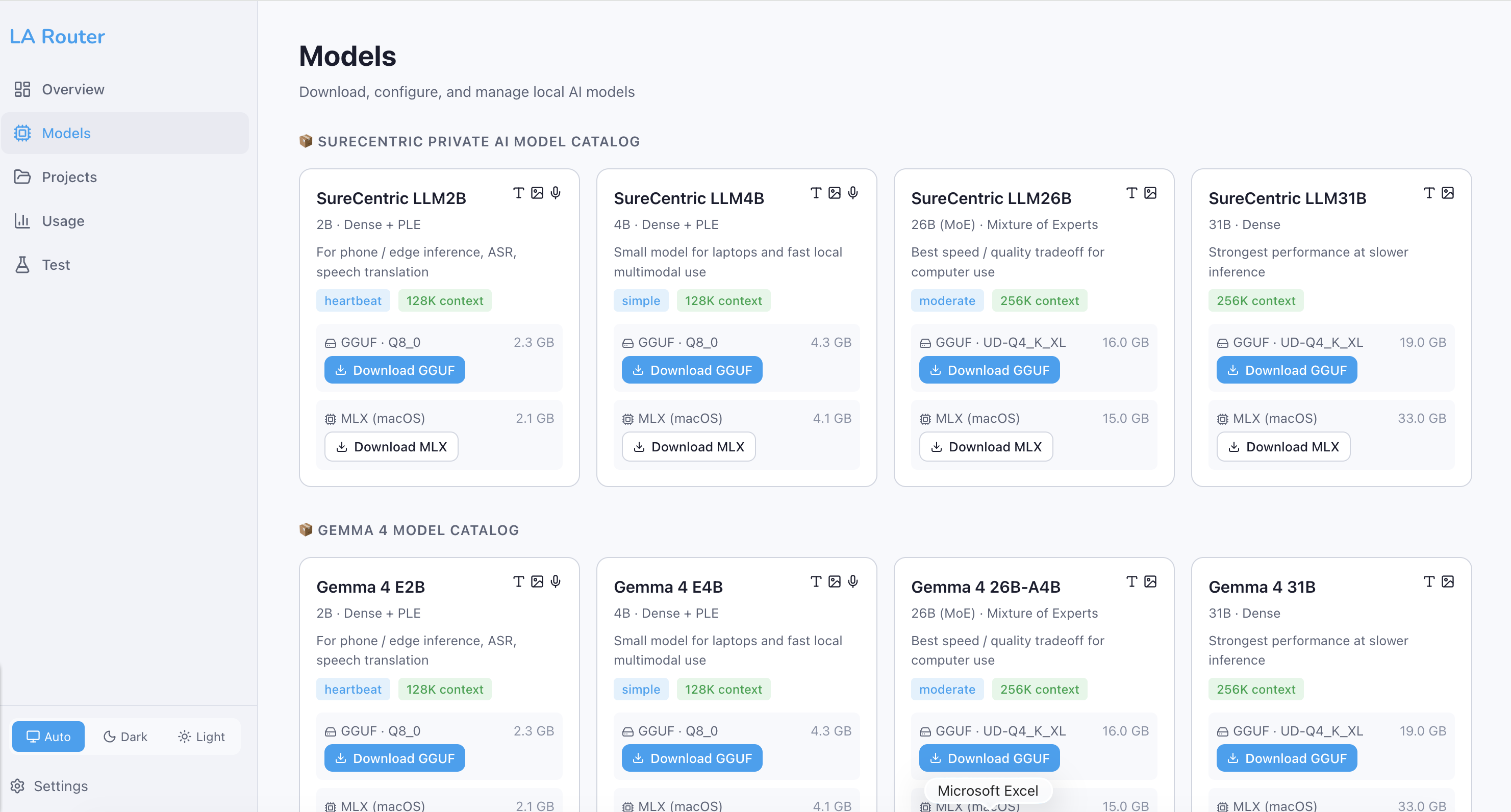
Local Models
LA Router's local-first architecture lets you run AI models directly on your own hardware — keeping data private, eliminating API costs, and enabling offline operation.
How Local Routing Works
When a request arrives, LA Router's hybrid classifier evaluates the task complexity. If the task falls into a Heartbeat, Simple, or Moderate tier, it is routed to a local model running on your machine via llama.cpp. No data ever leaves your network.
Your App → LA Router → Classifier
                          │
              ┌───────────┼───────────┐
              ▼           ▼           ▼
         Heartbeat     Simple     Moderate
         (2B local)   (4B local)  (26B local)
              │           │           │
              └───────────┼───────────┘
                          ▼
                     llama.cpp
                  (your hardware)
Small Models — Edge & Quick Tasks
For lightweight tasks like greetings, status checks, formatting, and simple Q&A, LA Router uses small local models (2B–4B parameters). These models:
- Start up instantly and respond in milliseconds
- Run on any laptop, even without a GPU
- Handle routine tasks with zero API cost
- Are ideal for edge devices, phone-class hardware, and CI pipelines
| Model | Params | Best For | Hardware |
|---|---|---|---|
| SureCentric LLM2B | 2B | Greetings, status, ASR, speech | Any laptop / phone |
| SureCentric LLM4B | 4B | Summaries, drafts, simple code | Laptop with 8GB RAM |
Medium Models — Private Data Processing
For tasks that involve sensitive or proprietary data — document analysis, internal search, compliance review — LA Router routes to medium local models (26B–31B parameters). These models:
- Process private data entirely on-premises
- Never transmit content to external APIs
- Offer quality competitive with cloud models for most business tasks
- Support multimodal inputs (text + images)
| Model | Params | Best For | Hardware |
|---|---|---|---|
| SureCentric LLM26B | 26B (MoE) | Document analysis, code review, private data | 16GB+ RAM, Apple Silicon recommended |
| SureCentric LLM31B | 31B | Complex reasoning on private data | 32GB+ RAM, GPU recommended |
When LA Router classifies a task as Heartbeat, Simple, or Moderate, no data is sent to any external service. The entire inference happens locally on your hardware.
Downloading Models from HuggingFace
All local models are downloaded from HuggingFace — the largest open-source model hub. LA Router supports two formats:
GGUF (Universal)
GGUF models run on any hardware via llama.cpp — CPU, GPU, or mixed. They use quantization to reduce memory requirements while preserving quality.
# Download via the dashboard (recommended)
# Navigate to http://localhost:5174/models → click "Download GGUF"

# Or via API
curl -X POST http://127.0.0.1:18790/api/models/download \
  -H "Content-Type: application/json" \
  -d '{"modelId": "sc-llm4b", "format": "gguf"}'
MLX (Apple Silicon)
MLX models are optimized for Apple Silicon Macs (M1/M2/M3/M4), leveraging the unified memory architecture for maximum performance.
# Download via dashboard → click "Download MLX"
# Or via API with format: "mlx"
Using Privately Trained & Licensed Models
LA Router also supports custom fine-tuned models and commercially licensed LLMs downloaded from HuggingFace:
-
Fine-tuned models — If your organization has fine-tuned a model for a specific domain (legal, medical, financial), you can host it on a private HuggingFace repository and download it through LA Router.
-
Licensed models — Commercial models distributed through HuggingFace (with gated access) can be downloaded using your HuggingFace token:
# Set your HuggingFace token for gated model access
export HF_TOKEN=hf_your_token_here

# The model will be downloaded and served locally via llama.cpp
- Air-gapped deployment — For maximum security, models can be downloaded once and transferred to air-gapped environments. LA Router manages the local model lifecycle without requiring internet access after initial download.
Model Lifecycle
LA Router manages the full lifecycle of local models:
| Stage | Description |
|---|---|
| Download | Pull GGUF or MLX weights from HuggingFace |
| Start | Launch llama-server with the model loaded |
| Serve | Route matching requests to the running model |
| Stop | Gracefully shut down when no longer needed |
| Update | Check for newer quantization versions |
All of this is managed through the Models page in the dashboard or via the REST API.